
What Is a Wealth Management Client Portal? A Workflow Guide
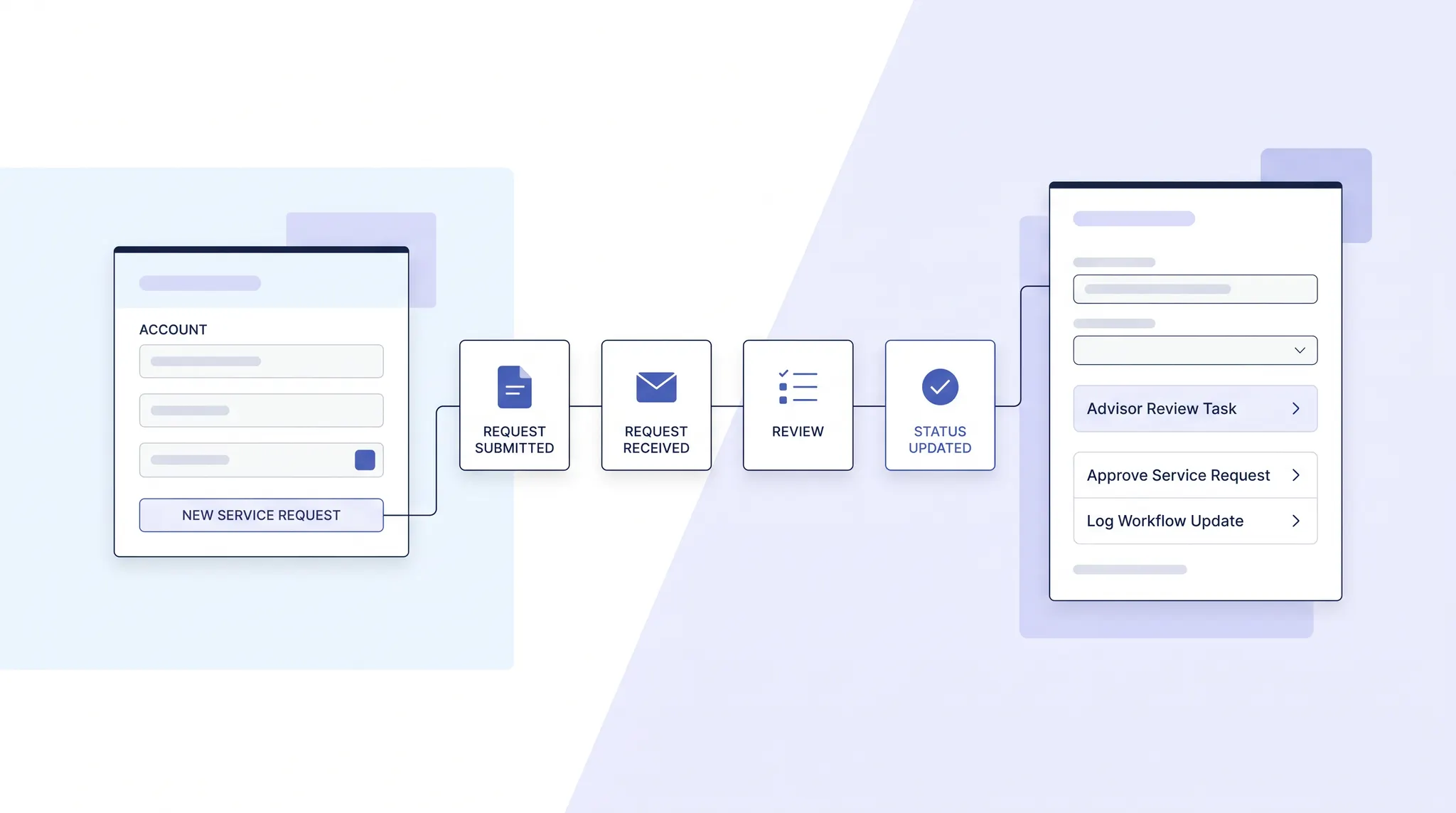
A client portal should connect account visibility, service requests, documents, and advisor follow-through. Use this workflow guide to test the handoffs behind the screen.
A wealth management client portal is a secure place for clients to see relevant account information and take part in servicing their relationship with an advisor. The useful distinction is what happens after a client acts. A balance screen answers a question; a connected portal also carries a request to the right team, shows its state, and returns a clear response. OneVest describes its Client Portal as a web and mobile experience for viewing a financial picture, requesting service, moving money, exchanging documents, and messaging an advisor.
For firms evaluating a portal, the question is not simply which screens look polished. It is whether the client view and the firm's operating workflow agree on the same request, permission, and outcome. This guide follows that handoff without assuming any portal replaces the firm's own controls.
The portal has two sides
On the client side, a portal needs to make information understandable and actions easy to find. On the firm side, somebody must own the action and know what to do next. A client who submits a transfer request should not have to guess whether it was received, approved, sent to a custodian, or completed. A document upload should arrive with enough context for the right team to review it, not just land in a shared folder.
OneVest's Advisor Workspace describes the other side of that experience: advisors work from client profiles, task queues, portfolio context, and connected workflows. These are distinct interfaces with different responsibilities. A portal may expose a status to a client while the advisor or operations team sees the underlying task, exception, or approval. The point is to maintain a consistent state between them, not to show both users the same internal screen.
Five handoffs to test
1. From account data to a useful client view
Start by asking what the client can see and where that information originates. Is an account managed here or held elsewhere? When was its data last updated? Which household member is allowed to view it? Do goals and documents carry enough context to avoid mistaking a partial view for a complete financial picture? These are evaluation questions, not promises that every outside account appears immediately. OneVest's Client Portal page describes consolidated wealth and goal views; a firm still needs to confirm the data sources and permissions in its own configuration.
2. From a client request to a named owner
A request should capture what the client wants, what information was supplied, and what additional validation is needed. The receiving team needs a clear owner and a visible next step. For money movement, distinguish a submitted instruction from an authorized, executed, or settled transaction. OneVest's Money Movement page describes policy-aware routing, exceptions, and transaction status, while the Client Portal page describes client-initiated requests. Buyers should trace one realistic request across both views and ask who can pause it when details conflict. A status label is useful only when its meaning is consistent with the actual processing state.
3. From a document upload to a controlled record
A client may share a statement, agreement, or identity document, but the firm needs to decide who can review it, whether it satisfies a requirement, and what version is retained. An upload is not the same as a verified field or a completed case. OneVest's Document Management page describes portal delivery, access controls, advisor confirmation of extracted values, and document steps within workflows. During evaluation, ask where a file is linked, how a missing item is flagged, and what a client sees while review is pending. Keep internal-only material separate from the documents intended for client access.
4. From a message to an accountable response
Secure messaging can reduce ambiguity only if a message can be connected to the relevant client, task, or case. A client may ask for an update in one channel while an advisor reviews the task in another. Test whether the advisor can see the request's context, whether a response is attributed to the person who sent it, and whether the client is told when more information is required. OneVest describes a shared messaging workspace within its Client Portal and contextual collaboration in the Advisor Workspace. That product description does not establish that every message or external channel is captured for every firm.
5. From activity to a defensible record
Permission and audit design matter most when a request goes wrong. Ask how access is assigned, what happens when a household role changes, and which events the firm can retrieve if a client disputes an instruction. The SEC's Regulation S-P amendments address safeguards for customer information, incident response, service-provider oversight, and compliance records for covered institutions. FINRA's advisory also directs member firms to review the amendments. Those rules are not a portal feature list, and buying software does not transfer an institution's obligations to a vendor. Compliance and security teams should evaluate the applicable requirements and the actual implementation.
A practical walkthrough for a product review
Give the vendor one ordinary scenario: a client uploads a document and asks to move funds from an existing account. Then follow the case across the client portal, advisor workspace, and operations queue. Ask to see:
- The original request and the client's visible acknowledgement.
- The source and freshness of the account information shown to the client.
- The person or team that owns each pending action.
- The review required before a document value or transfer instruction changes a record.
- The status shown to the client when a request is delayed, rejected, or completed.
- The permissions and history available to an authorized reviewer.
A demonstration should include an exception, not only a straight-through case. If an account detail is missing or a document needs correction, can the firm explain the next step without relying on an email thread or asking the client to start over? Record which parts were actually demonstrated and which depend on configuration, integrations, or policy decisions. That distinction keeps a buying decision tied to what the firm can deploy.
What to decide before rollout
Agree on the portal's role in the firm's service model. Identify which tasks clients can start, which require advisor or operations review, and which should remain outside self-service. Assign an owner to each exception path. Define household access and document visibility before importing sensitive records. Decide which status changes trigger a client notification and which are internal only. Finally, have the firm's compliance and security teams test data handling, service-provider oversight, and record retrieval against the rules that apply to the institution.
A client portal becomes useful when the client sees a clear next step and the firm can account for the work behind it. Start with one high-frequency request, map its handoffs, and expand only after its data, approvals, and client updates hold together.
Explore OneVest Client Portal to see how its client experience connects account visibility, requests, documents, and advisor interaction.