
How to review user access in wealth management
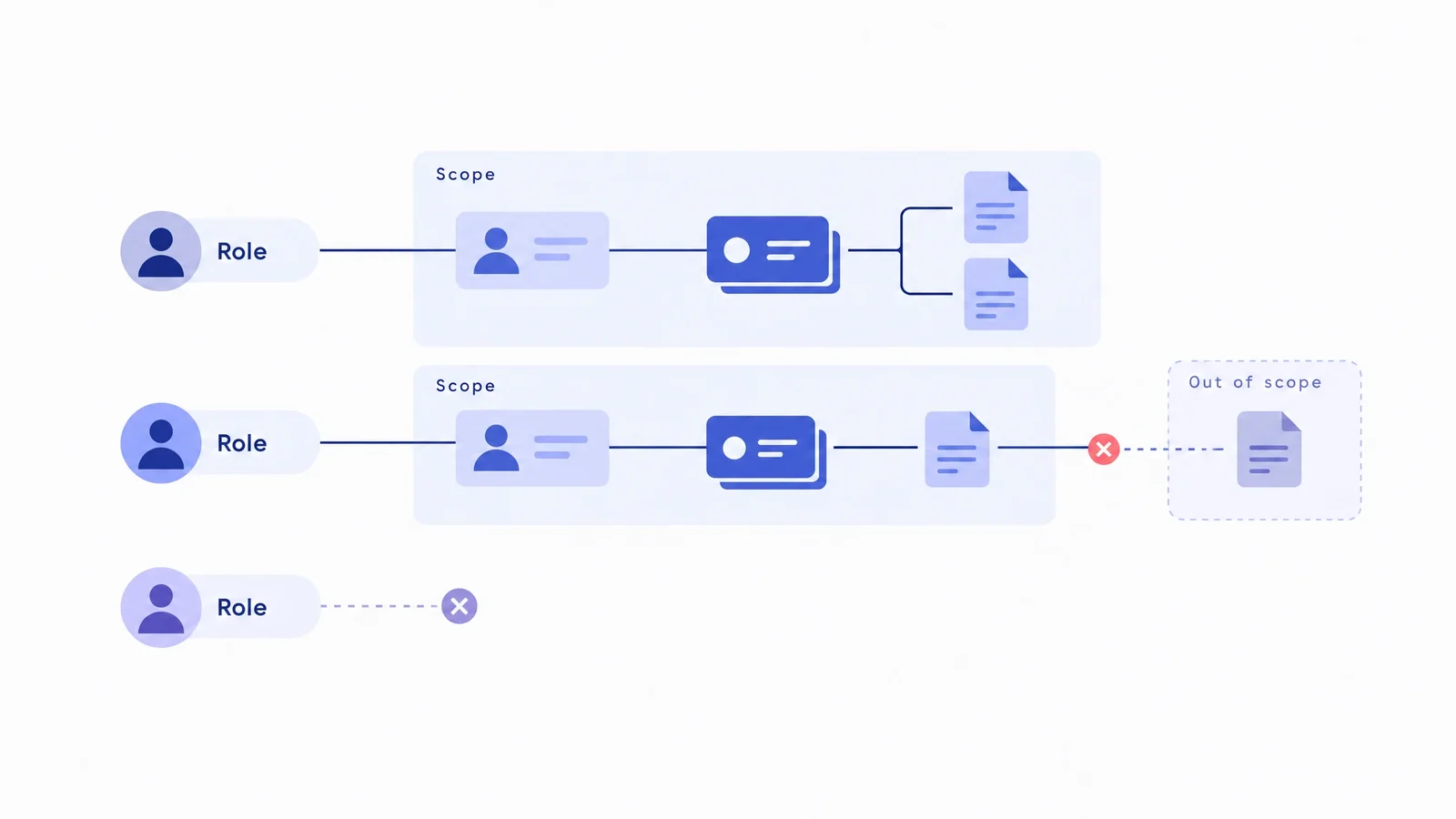
A role label is not proof of appropriate access. Compare current duties with actual permissions, then verify that changed or revoked access takes effect.
A user access review in wealth management checks whether each active identity can still see and do only what its current responsibilities require. Compare the people and service accounts in use with their actual permissions, obtain a business-owner decision, remove unnecessary access, and verify the result. Reviewing a list of role names alone does not establish that access is appropriate.
An advisor can change teams while retaining an old group membership. Temporary cover can become permanent access. A departed employee can leave behind a local application account or a connection that needs separate handling. These are review scenarios to investigate, not assumptions about your firm or platform.
Define the review boundary
Start with one business area and the systems that hold its client information or execute its work. Include the wealth platform, identity provider, custodian interfaces, document services and relevant integrations. Record which owner controls access in each system.
Separate staff access from client access, and distinguish ordinary users, administrators and nonhuman service identities. An account inventory answers who or what can authenticate. An entitlement review answers what that identity can reach and change.
CIS Control 5 addresses account management, while CIS Control 6 addresses access rights. They are security guidance, not wealth-management regulations. Use that distinction to keep an apparently complete staff list from hiding unreviewed privileges.
Collect actual access, not intended access
For each system, obtain the available account and permission evidence. Compare it with the current staff roster, team assignments, contractor dates and approved service-account owners. A provisioning request records what somebody asked for; it is not proof of what the application currently allows.
Capture enough information to support a decision:
- The identity, account type and responsible owner.
- The system, status, assigned roles and additional grants.
- The client, account, team or document scope those grants expose.
- The actions allowed, including exports and administration.
- The business reason, start date and any expiry condition.
- The source and date of the evidence.
Keep credentials out of the review record. For a service account, record its purpose and owner without copying its secret. CIS Control 5 specifically includes service-account inventories and recurring authorization checks. An integration without a current owner belongs in the exception list, not the approved list.
Compare permissions with current duties
Ask whether each grant is needed for the job being performed now. Do not infer authority from seniority, household membership or a familiar role name. Reading a client profile, editing it, downloading documents and approving a consequential action are separate decisions.
Consider an operations specialist who temporarily supported another team. Their normal role may still be correct, while the additional team scope is no longer justified. Conversely, a supervisor may need a broader view without needing permission to change every record. Review scope and action together.
OWASP's authorization guidance recommends least privilege, permission checks on every request and periodic review for privilege creep. It also distinguishes authentication from authorization. Successful sign-in proves identity verification, not permission to access every client or function.
OneVest's Operate materials describe role-based money-movement permissions and approvals within configured journeys. Those are relevant control surfaces to examine. Confirm the actual roles and approval rules for your implementation rather than treating a package description as a completed access review.
Make business decisions explicit
Give the business reviewer the actual scope and actions, not just an application name. The decision should be to retain, change or revoke a grant, with a reason that relates to current responsibilities.
Separate responsibilities. The business owner confirms the need; the system owner applies the change; a reviewer checks the result. Small firms may combine some responsibilities, but should make that choice visible and define how consequential grants receive independent scrutiny.
If temporary access must remain, record the reason, accountable owner, expiry and required follow-up. Do not let a missing response count as approval. Unclear ownership, unexplained administrator rights and conflicting team assignments need a dated exception with a decision owner.
Review document-sharing scope as well as account data. OneVest's Engage experience includes messaging and document sharing, which creates another relevant area for the firm to validate. Access to a client relationship does not, by itself, settle which documents each person should receive.
Verify changed and revoked access
Closing a removal ticket is not the same as proving removal. Check the application's current permissions and use approved test identities with synthetic records to verify the boundary. Security and system owners should agree on safe tests; do not probe real client records without authorization.
Test cases should cover:
- A user who retains the expected access after a permitted role change.
- The same user being denied access to a former team's out-of-scope records.
- A read-only identity being denied a prohibited change.
- A removed identity no longer reaching the relevant protected functions.
- A revoked integration grant no longer performing its former operation.
Ask how existing sessions, delegated connections and locally managed accounts are handled. Single sign-on can centralize entry, but confirm which applications and access paths it actually governs. Do not assume that changing one directory record updates every connected system.
CIS Control 6 recommends a revocation process tied to termination, rights revocation and role changes. It notes that disabling accounts rather than deleting them may be necessary to preserve audit trails. Removing access should not erase the firm's record of earlier work or leave active cases without an owner.
Keep evidence and exceptions separate
For each reviewed grant, retain the evidence date, business decision, person who applied the change and verification outcome. Where a test is unavailable, state what was checked and what remains unproven. A vendor statement and an observed denial are different forms of evidence.
Protect the review material itself. Permission exports can reveal staff responsibilities, system structure and sensitive client scope. Store only the information needed, restrict reviewer access and follow the firm's retention policy.
FINRA's 2026 cybersecurity report identifies insider threats and potential exposure of customer information among member-firm risks. Its context is FINRA member firms, not a universal rule for all RIAs or Canadian institutions. An access review supports control oversight; it does not establish regulatory compliance on its own.
Review after change, not only on a calendar
Set a recurring review cadence based on risk and applicable obligations, but also act when a person joins, moves roles, leaves, or receives temporary access. Material system and team changes can alter the review boundary.
Keep the benchmark distinctions straight. CIS Control 5 recommends at least quarterly account-inventory validation; Control 6's role-based privilege review guidance specifies at least annual review. Those are different checks, not interchangeable regulatory deadlines or permission to wait for a scheduled review before revoking obsolete access.
OneVest's Core page describes team management, audit logging, SSO and advanced access controls. Confirm their configuration, evidence availability and connection boundaries with your implementation team. The published material does not establish a native access-certification dashboard or automatic revocation across every external system.
Start with a defined system boundary and current grants. Finish with justified permissions, verified changes and explicit unresolved exceptions.